> ## Documentation Index
> Fetch the complete documentation index at: https://docs.runchat.com/llms.txt
> Use this file to discover all available pages before exploring further.
# Routing
> Conditionally enable parts of a workflow with Switch and Router nodes from the Flow library. Drive routing decisions with agents, code, or boolean inputs.
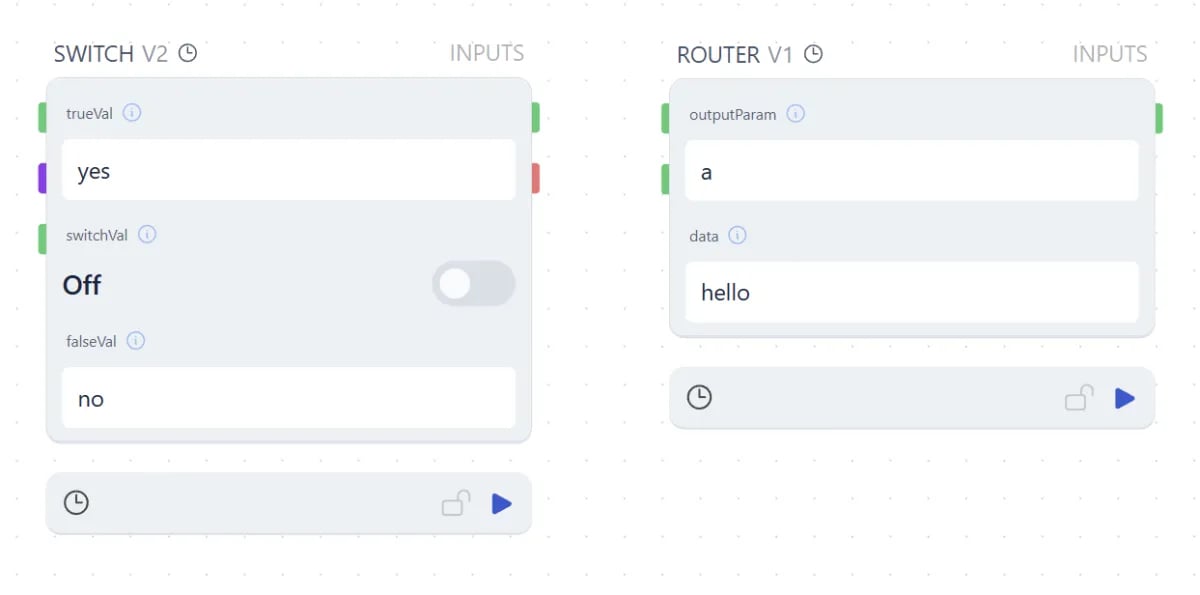
The `Flow` default library has two routing nodes for building workflows that take different paths under different conditions. **Switch** routes one input to one of two outputs based on a boolean. **Router** routes a list to multiple named outputs.
 ## Switch
The Switch node takes a `switchVal` (boolean) and enables one of two outputs:
* When `switchVal` is **on**, `trueVal` is enabled and downstream nodes update.
* When `switchVal` is **off**, `falseVal` is enabled and downstream nodes update.
Nodes wired to the disabled output do not update.
### Driving the switch with an Agent
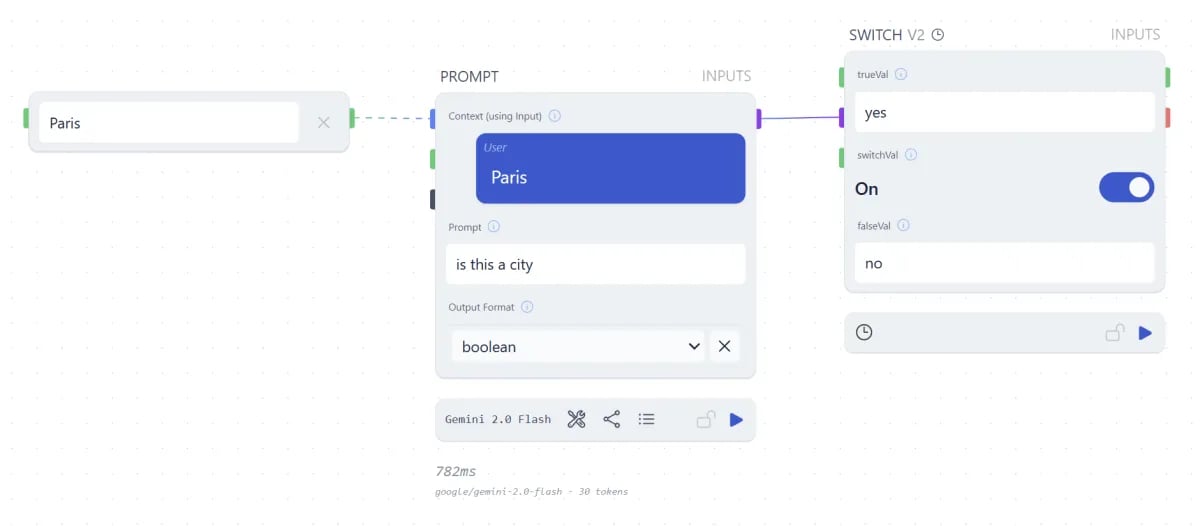
A common pattern is to control the switch with a language model. Set an Agent node's output format to **boolean** and frame your prompt as a yes/no question, like "is this image suitable for a portfolio?". This lets the workflow react to subjective conditions without you having to write classification logic.
## Switch
The Switch node takes a `switchVal` (boolean) and enables one of two outputs:
* When `switchVal` is **on**, `trueVal` is enabled and downstream nodes update.
* When `switchVal` is **off**, `falseVal` is enabled and downstream nodes update.
Nodes wired to the disabled output do not update.
### Driving the switch with an Agent
A common pattern is to control the switch with a language model. Set an Agent node's output format to **boolean** and frame your prompt as a yes/no question, like "is this image suitable for a portfolio?". This lets the workflow react to subjective conditions without you having to write classification logic.
 ### Driving the switch with code
When the condition is empirical, use a Code node that returns a boolean. This works well for:
* Checking whether a string equals an expected value
* Confirming whether you have data
* Checking whether a key exists in an object
* Comparing a value to a threshold
You can use this to gracefully handle errors, send notifications, or fix missing data before the workflow continues.
## Router
The Router node is a Switch for lists. It takes a list of values and a matching list of output parameter names, and sends each value to the output with the matching name.
Generate the parameter name list with an Agent or Code node, one name per item in your data list. To disable a particular output (the way Switch does), pass `null` for that item.
## Next steps
* [Data Structure](/concepts/data/data-structure): why everything is a list under the hood
* [Loops](/concepts/data/loops): pass output back upstream for iteration
* [Agent Capabilities](/concepts/agents/capabilities): use the chat agent to drive routing decisions
### Driving the switch with code
When the condition is empirical, use a Code node that returns a boolean. This works well for:
* Checking whether a string equals an expected value
* Confirming whether you have data
* Checking whether a key exists in an object
* Comparing a value to a threshold
You can use this to gracefully handle errors, send notifications, or fix missing data before the workflow continues.
## Router
The Router node is a Switch for lists. It takes a list of values and a matching list of output parameter names, and sends each value to the output with the matching name.
Generate the parameter name list with an Agent or Code node, one name per item in your data list. To disable a particular output (the way Switch does), pass `null` for that item.
## Next steps
* [Data Structure](/concepts/data/data-structure): why everything is a list under the hood
* [Loops](/concepts/data/loops): pass output back upstream for iteration
* [Agent Capabilities](/concepts/agents/capabilities): use the chat agent to drive routing decisions