> ## Documentation Index
> Fetch the complete documentation index at: https://docs.runchat.com/llms.txt
> Use this file to discover all available pages before exploring further.
# Grasshopper Examples
> Download example Grasshopper definitions for scripting, editing images, and generating 3D models with Runchat
Ready-to-open Grasshopper definitions covering image editing, mesh generation, and scripting workflows.
Download GH Examples
ZIP
## Designing with Generative Models in Grasshopper
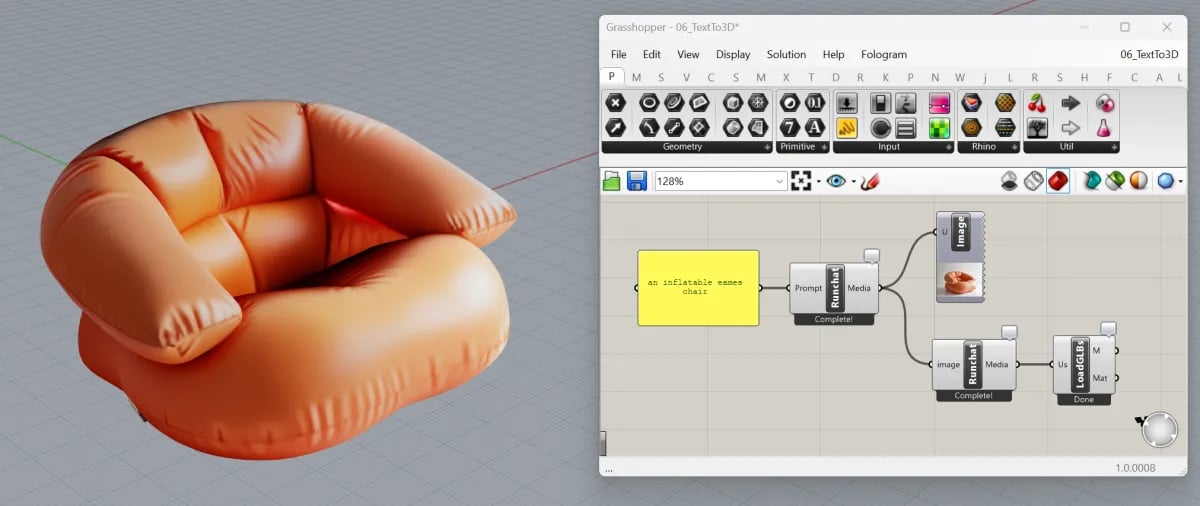 One of the best use cases for Runchat in Grasshopper is generating families of 3D objects with a consistent style.
These assets can be used for concept design, populating environments in games, exploring forms, generating interior design concepts and more.
## Next steps
* [Runchat for Grasshopper](/plugins/grasshopper): plugin setup and the chat agent
* [Components → Runchat](/node-reference/grasshopper/components/runchat): full component reference
* [Components → Utilities](/node-reference/grasshopper/components/utilities): screenshot, GLB import, projection, viewport preview
* [Runchat in Grasshopper playlist](https://www.youtube.com/playlist?list=PLgT771y9VleCS5gxbNS1h6MQ8KxMm--t-) on YouTube
One of the best use cases for Runchat in Grasshopper is generating families of 3D objects with a consistent style.
These assets can be used for concept design, populating environments in games, exploring forms, generating interior design concepts and more.
## Next steps
* [Runchat for Grasshopper](/plugins/grasshopper): plugin setup and the chat agent
* [Components → Runchat](/node-reference/grasshopper/components/runchat): full component reference
* [Components → Utilities](/node-reference/grasshopper/components/utilities): screenshot, GLB import, projection, viewport preview
* [Runchat in Grasshopper playlist](https://www.youtube.com/playlist?list=PLgT771y9VleCS5gxbNS1h6MQ8KxMm--t-) on YouTube