> ## Documentation Index
> Fetch the complete documentation index at: https://docs.runchat.com/llms.txt
> Use this file to discover all available pages before exploring further.
# Text
> Multiline text input that you can type, paste, generate, or drive from another node
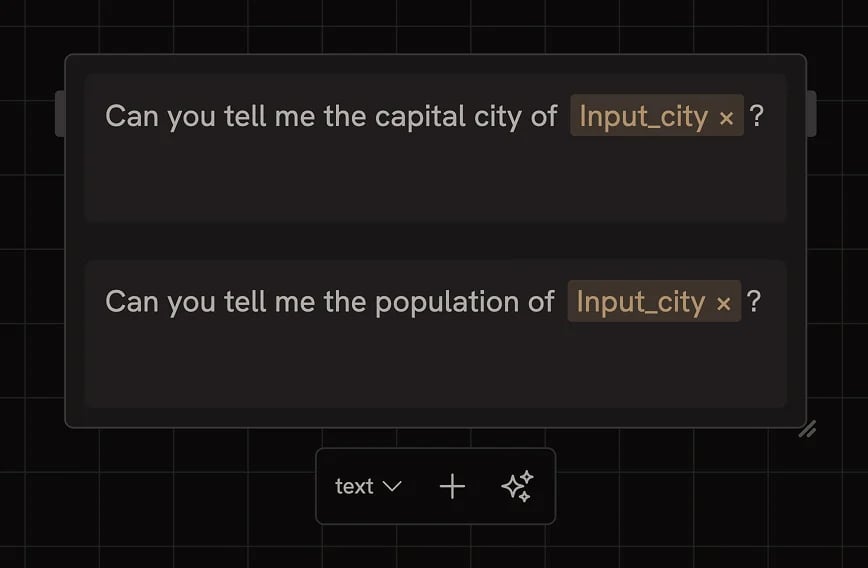 The Text node is a multiline text input. Type or paste anything: a prompt, a system message, a list of names, a markdown document. The output is whatever you've entered, ready to wire into another node.
## Adding multiple values
Click the **+** button in the settings bar to add another text item, turning the node into a list. Lists are how you fan out a workflow over multiple values: pair a list of 5 prompts with a Create node and you get 5 results in one run. See [Data Matching](/concepts/data/data-matching) for how lists are handled across multiple inputs.
## Generating a list
Click the **Generate data** button (✨) in the settings bar to generate a list of items from whatever you've typed as a prompt.
For example, type `5 modernist architects` and click Generate data. The node fills with a list of five items. Useful when you want to seed a workflow with example data, brainstorm options, or generate test inputs without manually typing each one. The button is only available on text inputs.
## Driving the text from another node
Connecting any output to the Text node casts it to a string and displays it in the field. The Text node will re-cast and re-display every time the upstream node runs.
## Inline references
Inside any text field you can press `Tab` (or `@`) to insert a reference to another node's output. Useful for building template strings where one part of the prompt comes from a [Text Input](/node-reference/nodes/inputs/text), an Agent, or a Code node. See [Data Referencing](/concepts/data/data-referencing).
You can also reference [credentials](/concepts/integrations/credentials) the same way when constructing API calls.
## Next steps
* [Data Matching](/concepts/data/data-matching): control how lists fan out across runs
* [Data Referencing](/concepts/data/data-referencing): inline references and template strings
* [Agent node](/node-reference/nodes/agent): use generated text as prompts
The Text node is a multiline text input. Type or paste anything: a prompt, a system message, a list of names, a markdown document. The output is whatever you've entered, ready to wire into another node.
## Adding multiple values
Click the **+** button in the settings bar to add another text item, turning the node into a list. Lists are how you fan out a workflow over multiple values: pair a list of 5 prompts with a Create node and you get 5 results in one run. See [Data Matching](/concepts/data/data-matching) for how lists are handled across multiple inputs.
## Generating a list
Click the **Generate data** button (✨) in the settings bar to generate a list of items from whatever you've typed as a prompt.
For example, type `5 modernist architects` and click Generate data. The node fills with a list of five items. Useful when you want to seed a workflow with example data, brainstorm options, or generate test inputs without manually typing each one. The button is only available on text inputs.
## Driving the text from another node
Connecting any output to the Text node casts it to a string and displays it in the field. The Text node will re-cast and re-display every time the upstream node runs.
## Inline references
Inside any text field you can press `Tab` (or `@`) to insert a reference to another node's output. Useful for building template strings where one part of the prompt comes from a [Text Input](/node-reference/nodes/inputs/text), an Agent, or a Code node. See [Data Referencing](/concepts/data/data-referencing).
You can also reference [credentials](/concepts/integrations/credentials) the same way when constructing API calls.
## Next steps
* [Data Matching](/concepts/data/data-matching): control how lists fan out across runs
* [Data Referencing](/concepts/data/data-referencing): inline references and template strings
* [Agent node](/node-reference/nodes/agent): use generated text as prompts