

Add the connector
Setup takes about a minute. You do it once — Claude connects to Runchat from Anthropic’s servers, not from your machine, so the connector follows your account into Claude Desktop, claude.ai, and mobile. There’s nothing to install and nothing to repeat per device. The steps below are the same in the desktop app and the browser. Pick the section that matches your plan — this matters, because on Team and Enterprise plans only an Owner can add a custom connector.- Free, Pro & Max
- Team & Enterprise
- Claude Code (CLI)
- Other MCP clients
1
Open Connectors
In the left sidebar, click Customize, then click Connectors.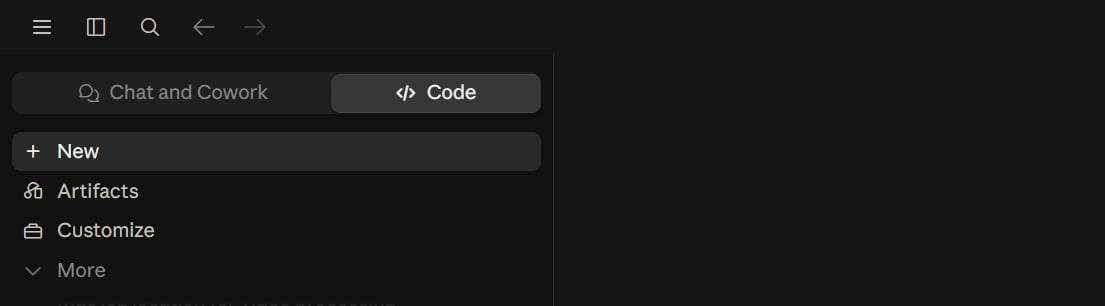
2
Start a custom connector
Click the Add dropdown at the top right, then choose Add custom connector.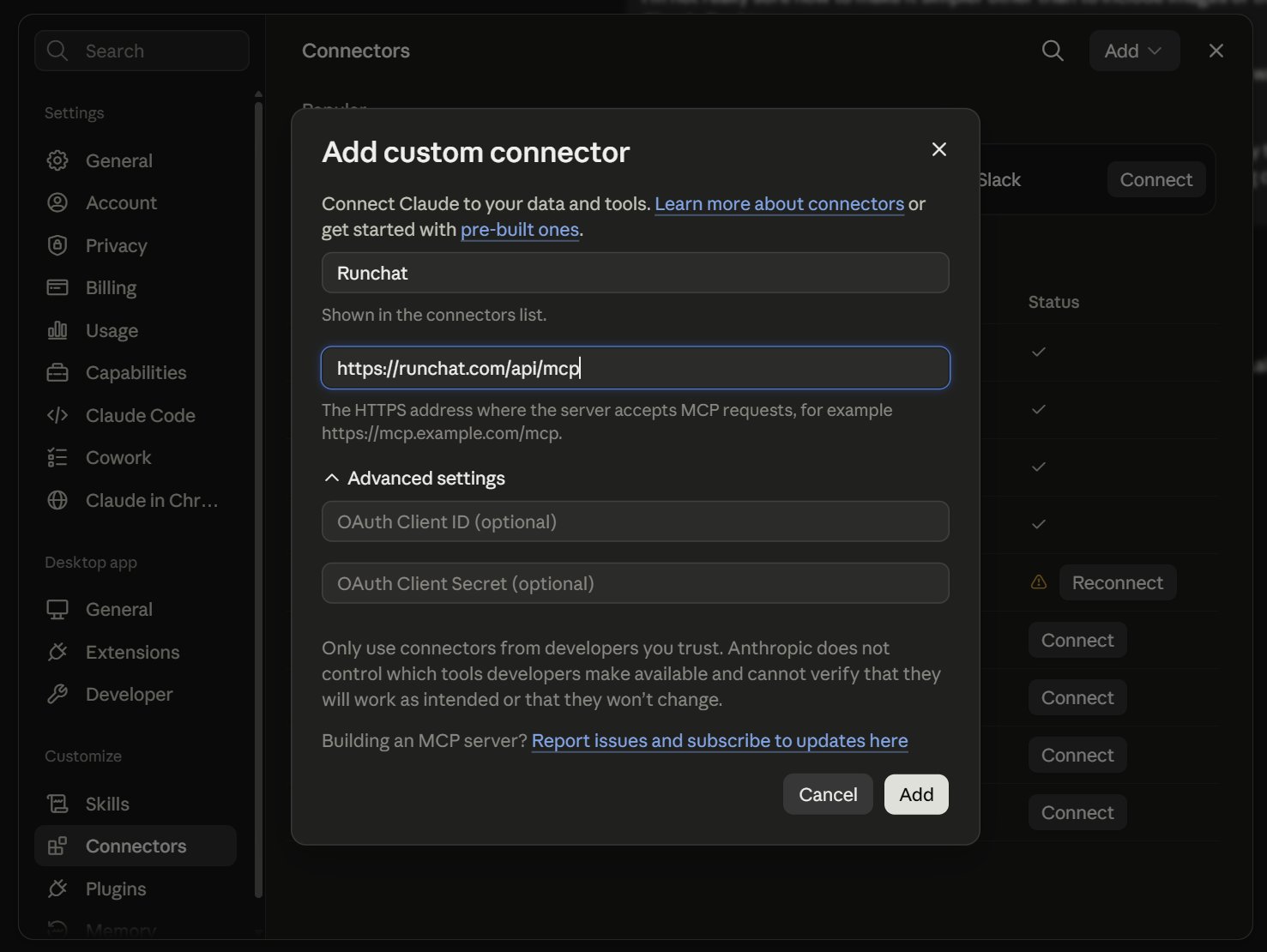
3
Enter the name and URL
Name it 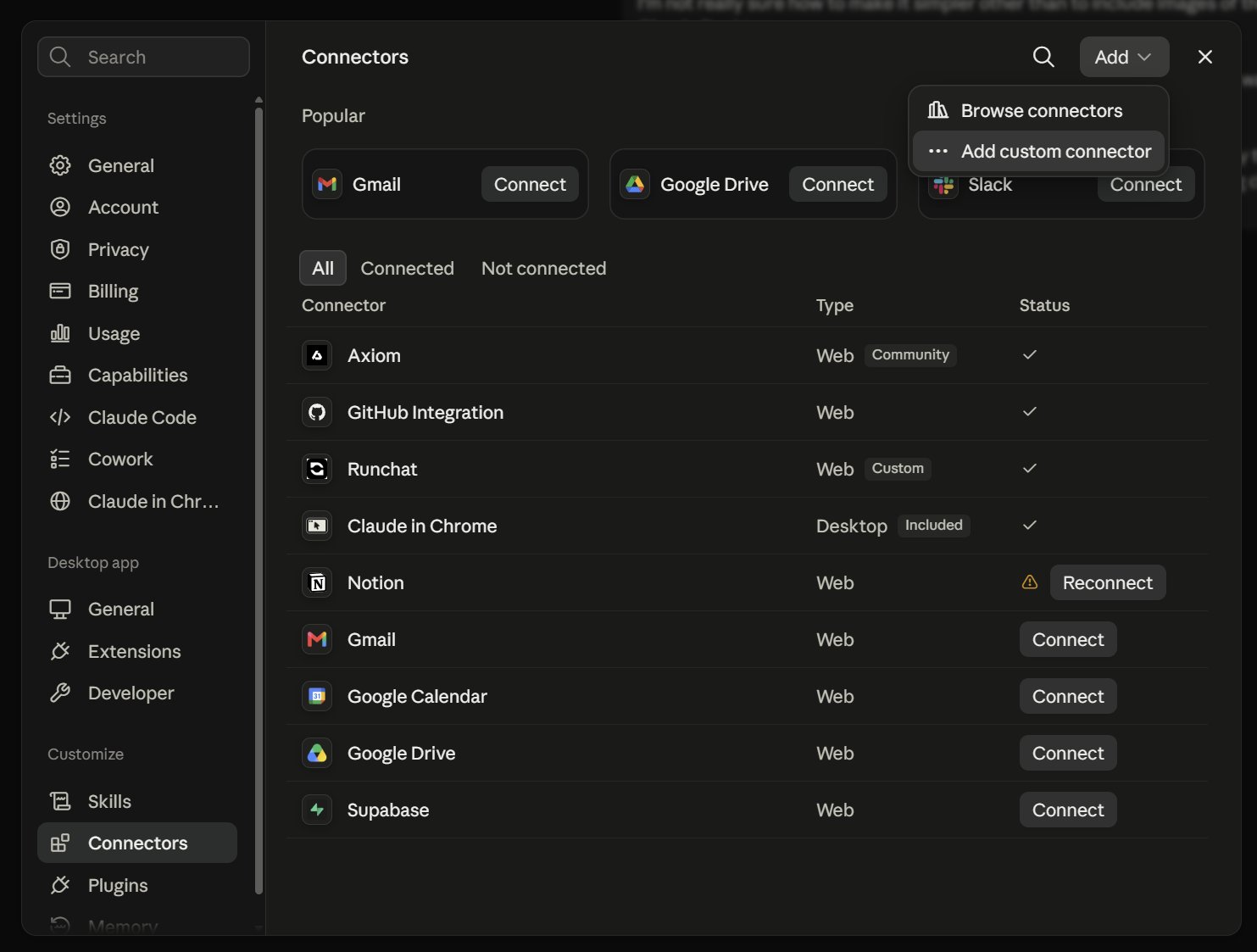
Runchat, and paste https://runchat.com/api/mcp into the URL field.Leave Advanced settings alone — the OAuth Client ID and Secret are optional and Runchat doesn’t need them. Click Add.4
Connect and approve
Runchat now appears in the connectors list with a Connect button. Click it.A browser window opens. Sign in to Runchat if you aren’t already, then approve access when the consent screen appears.
5
Check it worked
Back in the connectors list, Runchat should show type Web with a Custom badge and a checkmark instead of the Connect button.Ask Claude “list my runchats” to confirm the tools are live.
Free accounts can have one custom connector at a time. If you already
have one, you’ll need to remove it first.
Authenticating with an API key
If your client doesn’t support OAuth, or you’re scripting server-to-server, you can authenticate with a Runchat API key instead of signing in:- Sign into Runchat, click your account button, then Get Runchat API Key.
- Create a key and copy it.
- Configure your MCP client to send it as a bearer token:
Authorization: Bearer <your_api_key>.
Troubleshooting
I don't see an 'Add custom connector' option
I don't see an 'Add custom connector' option
You’re almost certainly on a Team or Enterprise plan, where only Owners can add custom connectors. Ask an Owner to add Runchat at the organization level — see the Team & Enterprise tab above — and it will then appear in your list with a Connect button.
I approved access but Claude says it has no tools
I approved access but Claude says it has no tools
Reopen Customize → Connectors and check Runchat shows a checkmark rather than Connect or Reconnect. If it says Reconnect, the authorization expired — click it and approve again. Then start a new chat: connectors added mid-conversation aren’t picked up by the conversation already in progress.
I signed into the wrong Runchat account
I signed into the wrong Runchat account
Remove the connector, sign out of Runchat in your browser, then add the connector again and sign in with the account you want. The consent screen uses whichever Runchat session your browser already has.
Do I have to repeat this on my other devices?
Do I have to repeat this on my other devices?
No. Remote connectors are attached to your Claude account, not your machine — once added, Runchat is available in the desktop app, claude.ai, and mobile. Claude Code is the one exception; see its tab above.
Claude can't see a specific workflow
Claude can't see a specific workflow
The agent can only reach workflows you own or that are shared with your team. Share the workflow’s URL directly in the chat, or use Copy ID from the runchat menu and paste that.
What the agent can do
Once connected, the agent has the same canvas abilities as the in-app assistant:- Find & create runchat workflows —
list_runchats,create_runchat - Read the canvas and inspect node parameters —
get_canvas,read_nodes - Build prompt, code, input, image, note, and sub-workflow nodes —
create_prompt_node,create_code_node,create_input_node,create_image_node,create_note,place_tool,create_artifact_node,update_node - Connect & organize nodes into workflows —
connect_nodes,organize_nodes,delete_nodes,delete_edges - Edit code in code nodes with find-and-replace or full rewrites —
read_files,edit_file,create_files,delete_files,read_status - Discover models and their parameters —
list_models,get_model_params - Find & run published tools — search the tool library (and your own runchats), inspect how a tool is built, and run one directly without adding it to a canvas —
search_tools,inspect_tool,execute_tool - Load skills for specialized environments (Rhino, Blender, Revit, HTML) —
use_skill - Drive Rhino, Grasshopper & Blender whenever Runchat is open inside the CAD app on the same account — read/build the Grasshopper canvas, run Rhino commands, run Python in Blender, and capture the viewport —
grasshopper_api,run_rhino_command,run_blender_command,take_screenshot - Run nodes and read the results —
run_nodes - Publish Create reusable tools and apps from your workflows —
publish_runchat
Using the MCP with Rhino and Grasshopper
The MCP reaches Rhino through your signed-in Runchat plugin session. The plugin just needs to be open — it doesn’t matter which workflow (if any) it’s showing:- Launch Runchat in Rhino and sign in with the same account the MCP is connected to
- Ask the agent to run Rhino commands, build a Grasshopper definition, or capture the viewport
Example
Running nodes consumes credits. The agent will confirm before executing any
run_nodes calls. Share the editor link it returns to watch progress or take
over in the app.Programmatic access
Prefer a terminal to an MCP client? The@runchat/cli command line is a port of this server — the same tools as scriptable runchat … commands. Or call the Canvas API over plain HTTP.