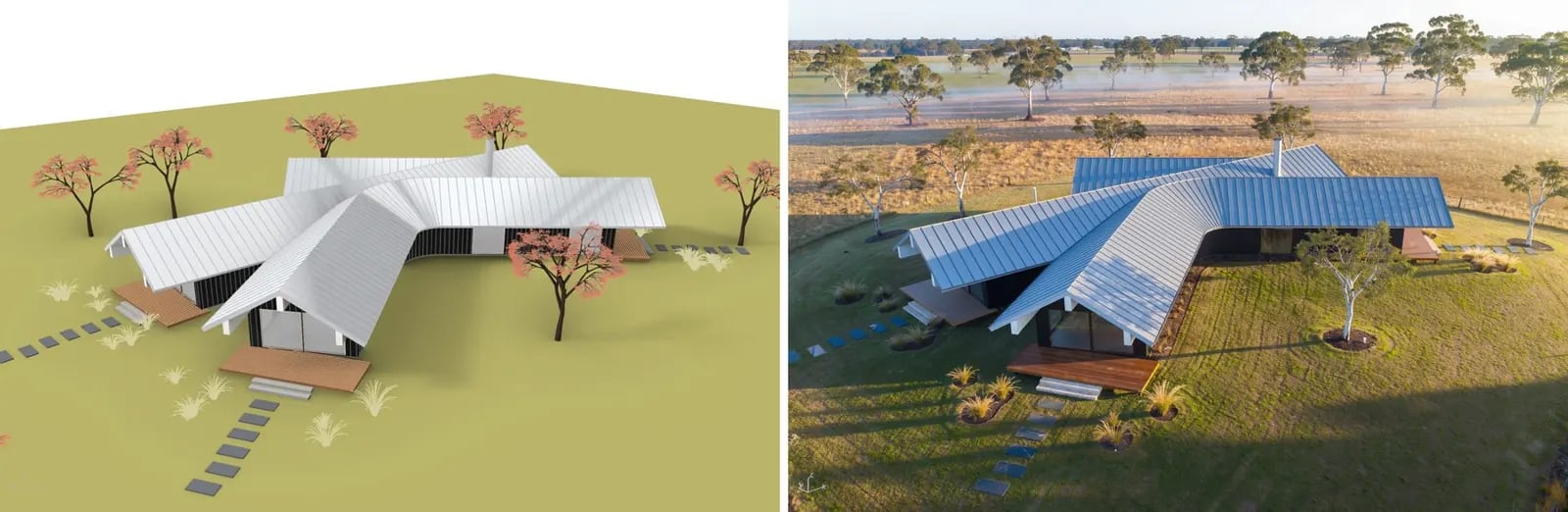
Rhino’s Rendered mode already has your materials and sun, just not convincingly. Use the quick render as the base and let an image model relight it as a photograph, keeping the camera and the layout.
A quick Rhino Rendered-mode aerial view of a house beside the relit photograph

Open the example workflow

Make a copy of this workflow in your account to try it with your own images.

How it works

  1. Quick Rhino render is a Rendered-mode capture with the document sun set where you want it.
  2. Relight as photograph (Flux 3) keeps the camera, building, decks, paths and tree positions, and describes the materials and light to aim for.

Tips

  • Flux 3 is good at holding geometry and camera. Nano Banana Pro gives richer light but sometimes reframes the view.
  • Name the things that must not move (paths, trees, decks) in the prompt.

Use your own model

The image input holds a capture from our demo Rhino model, so the workflow runs as it is. To use your own model, open Rhino with the Runchat plugin signed in, set up your view, and run the node marked (optional) Rhino. Then drag its screenshot into the image input. The scripts use only the standard display modes and match layers or materials by the keywords in their inputs, so they work on any model.