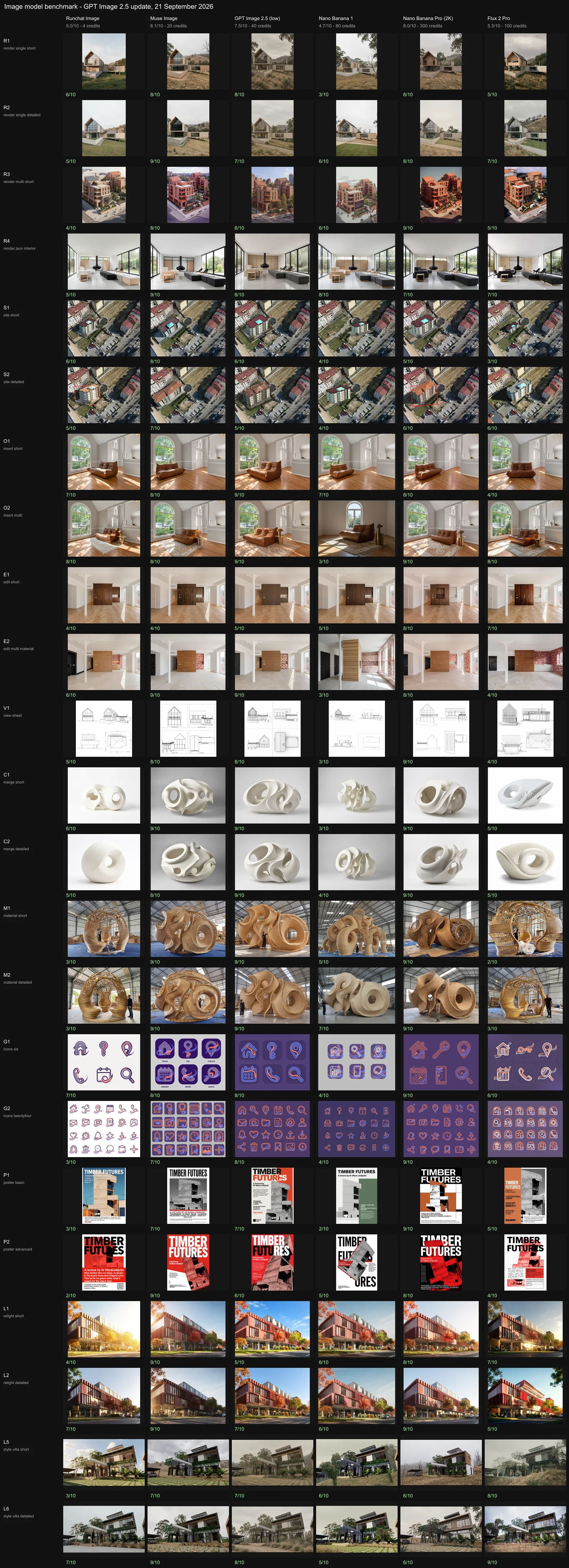
Runchat gives you a lot of image models, and they are not interchangeable. A model that turns a viewport screenshot into a convincing photograph can be hopeless at laying out a poster, and the cheapest model in the list is worth trying first on some tasks. This page summarises a benchmark we ran in September 2026: six image models, 23 design tasks, every output ranked blind against the same criteria. Use it to pick a starting model for a task, then check the credits page for what it will cost.
Scores are relative to this field of six models on this set of tasks, graded once. They tell you which model to reach for first, not an absolute quality number. We will re-run the benchmark as models change.

The short version

Credits per image are in brackets. “Cheapest good result” is the least expensive model that still scored 7 or better on the task, so it is never dearer than the best result.

Overall

Score is the mean of each model’s per-test score out of 10. Wins and lasts count tests where the model ranked first or sixth. The headline is that Muse Image edges Nano Banana Pro at a fifteenth of the price. Nano Banana Pro is still the safer pick when style and finish matter most, and it never came last. GPT Image 2 is a dependable middle option with the best text handling of the cheaper models. Runchat Image is the fastest and cheapest by far and is worth trying first on view-preserving edits, but it cannot do text, style transfer or anything that needs a reference read carefully.

Scores by dimension

Every output was scored 0 to 10 on four dimensions, then given a total.
  • Design adherence: did the geometry, view and elements the input defined survive.
  • Style adherence: how closely the output matches the reference’s light, colour and photographic character, or the written style when there is no reference.
  • Prompt adherence: were the instructions followed, including the ones the model would rather ignore.
  • Aesthetic quality: is it a good image on its own terms.

Scores by capability

Mean score out of 10 across the tests in each capability. Bold is the best in the row.

Every test and every output at a glance. Rows are tests, columns are models, the number is the score out of 10.

Results by task

Each strip shows the inputs on the top row and the six outputs below in rank order, best first, with the score out of 10. Where the view had to be preserved, a second image shows the input blended at 50% over each output: doubled edges mean the model moved the camera or redrew the design.

Rendering a screenshot with one reference

The barn is a white Revit model at 3:4. Image 2 is a photograph of a timber house on a dry hillside under overcast light, supplied for its materials and mood.
Photorealistic render of the house in image 1 using the materials and lighting of image 2.Muse Image and Nano Banana Pro both held the camera and took the pale boards, dark roof and soft light from the reference. GPT Image 2 was close to the reference aesthetic but changed the balustrade. Runchat Image kept the geometry best of all and the style least. Nano Banana 1 re-cropped and redesigned the house.
Render image 1 as a photorealistic architectural photograph, keeping the exact camera position, focal length, framing and aspect ratio of image 1, with every edge of the building where it is in the frame. Keep the geometry exactly as image 1 has it: the tall gable with its fully glazed gable end, the lower flat-roofed glazed wing extending to the right, the raised plinth and the window positions. From image 2 take only materials, lighting and mood: pale timber board cladding on the solid walls, a dark standing-seam metal roof, clear glazing with slim dark frames, and the soft overcast light and dry-grass hillside setting. Ground: mown grass with a gravel path.With the camera and materials spelled out, five of six models held the view. Muse Image, Nano Banana Pro and GPT Image 2 all landed the dry hillside and gum trees of the reference. Runchat Image put the house on a bright green lawn and it read as a render.

Rendering with several references

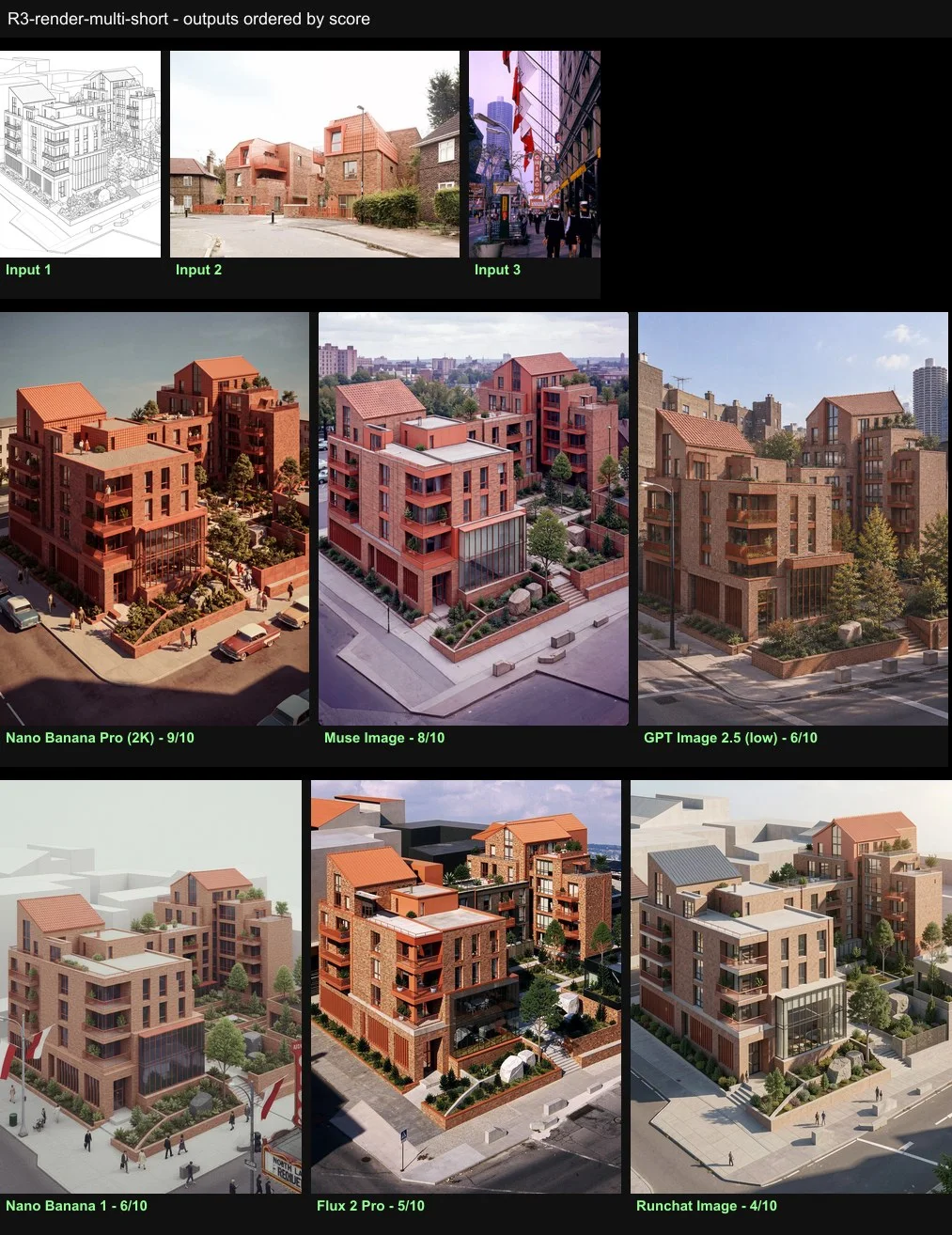
A black-and-white line drawing of courtyard housing, a brick and terracotta material reference, and a 1960s Kodachrome slide for photographic style. The point is role discipline: materials from one image, light and grade from another, geometry from the drawing.
Render image 1 as a photograph. Materials from image 2, photographic style from image 3.Nano Banana Pro delivered the warm faded Kodachrome grade, hard sun and even period cars, with brick and terracotta from image 2. Muse Image was the most balanced. GPT Image 2 imported the Chicago skyline from the style reference, and Nano Banana 1 copied its flags and signage wholesale. Runchat Image ignored the style entirely.

Rendering from a written spec with no reference

A hidden-line interior and a JSON prompt listing materials by element, lighting, camera, exposure and colour grade.
The prompt is a JSON object with a task line and keys for materials (floor, walls, joinery, window frames, fireplace, ottomans, lounge chairs, table), lighting, photography (24mm shift lens, deep focus, editorial style), colour and outside.Muse Image and GPT Image 2 assigned every material to the right element with the camera held. Nano Banana 1 was the most literal to the spec. Nano Banana Pro turned the oak desk block into charcoal boucle; Flux 2 Pro made the most beautiful image but turned the desk group black leather and lost the oak chair frames. Runchat Image read as a flat render.

Placing a design on a site

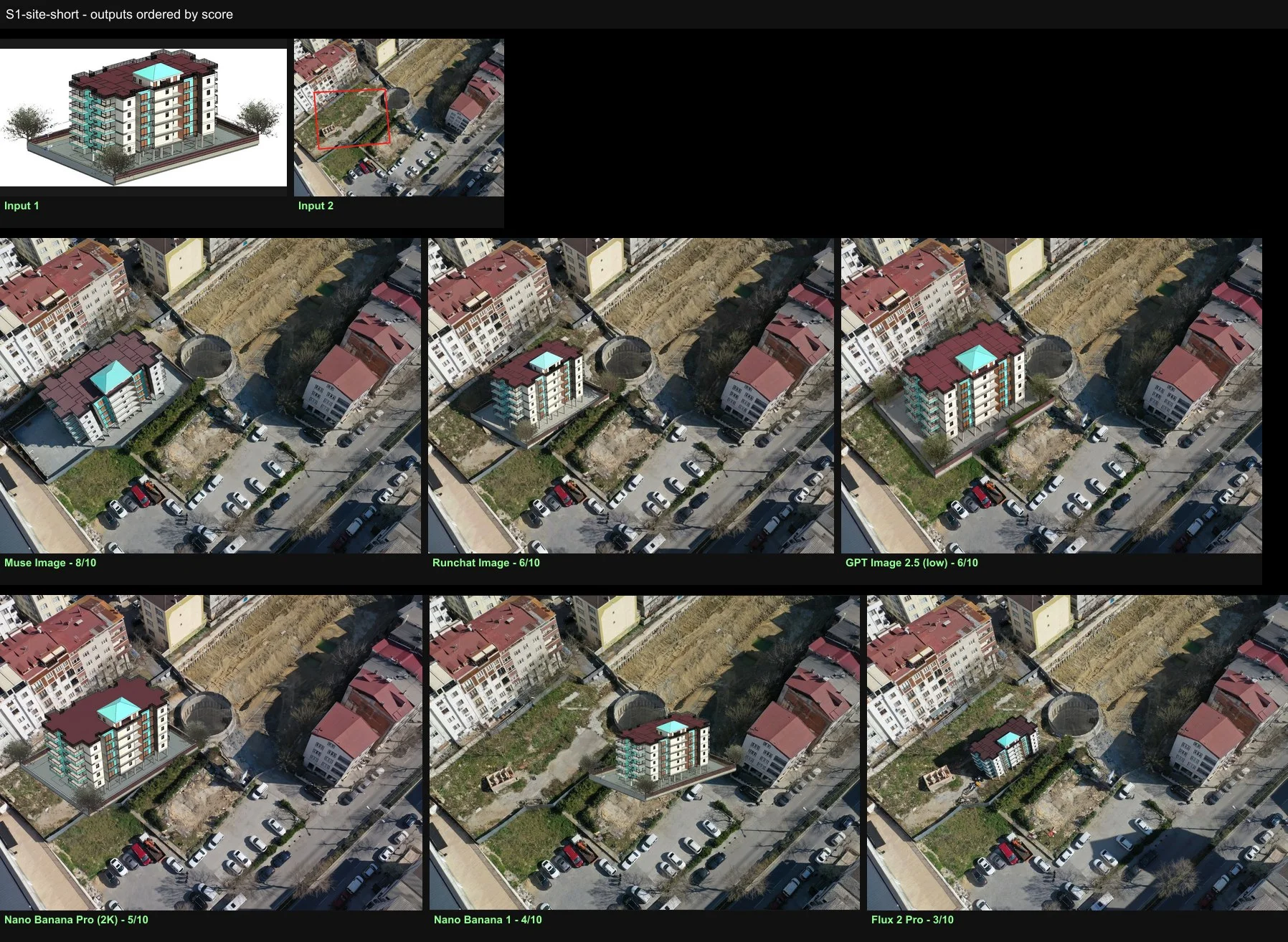
A Revit apartment block and an aerial photo with the lot outlined in red. Nothing did this well: most models pasted the render onto the photo without a shadow, and the two that integrated light and materials either left the red outline in place or redesigned the building.
Place the building in image 1 inside the red outline in image 2 and remove the outline.Muse Image and GPT Image 2 placed it inside the outline at the right scale with the outline removed. Nano Banana 1 drifted onto the neighbouring tank; Flux 2 Pro placed it at toy scale.
Place the building in image 1 inside the red outline in image 2, filling the outline with its long balconied facade facing the parking row at the bottom of the frame, and remove the outline. Scale: the same height as the neighbouring five-storey apartment blocks. Light: the same sun direction, shadow length and shadow softness as the existing buildings, with the shadow falling across the lot the way theirs do. Material: pale render and warm terracotta roof tiles in the same slightly dusty tones as the neighbouring buildings so it reads as part of the same street. Keep the viewpoint of image 2 and everything outside the outline exactly as photographed.Muse Image integrated terracotta, render and a matching shadow but grew the block past its neighbours. Nano Banana Pro matched the materials and shadow and left the red outline on the image.

Furnishing a room with correct lighting

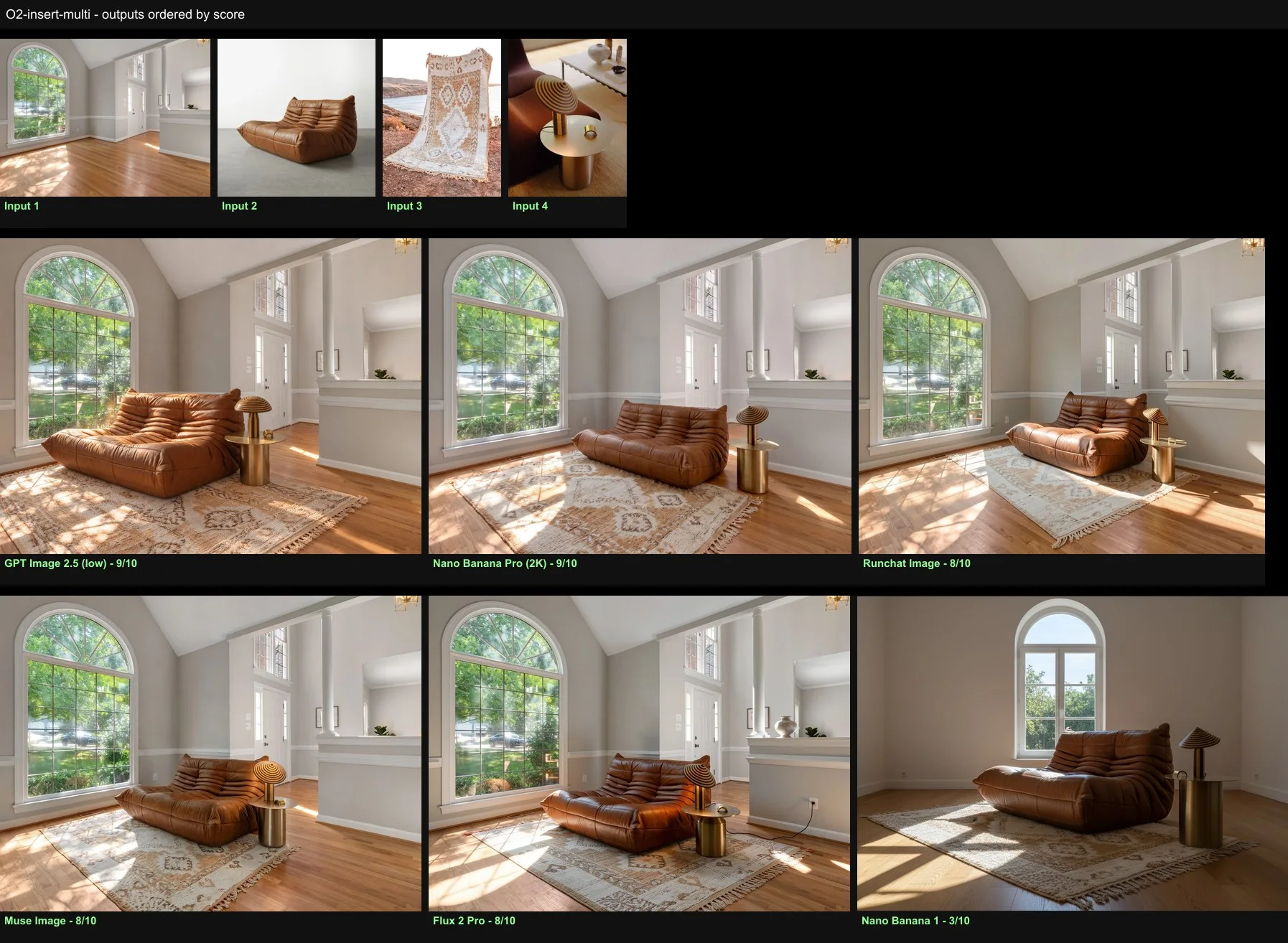
A Togo sofa into a sunlit room where hard light falls through an arched window from the left, then the same room furnished with the sofa, a rug and a brass side table with a striped lamp. The test is the shadow, then whether three pieces can share one sun.
Add the sofa from image 2 to the room in image 1, standing in the sunlight in front of the window.Muse Image and Nano Banana Pro kept the two-seater and lit it plausibly. Most others turned it into a single-seat Togo. Flux 2 Pro pasted it with flat light and no shadow.
Furnish the room in image 1 with the pieces in images 2 to 4. Place the sofa from image 2 on the floorboards inside the patch of direct sunlight in front of the arched window, turned three-quarters toward the camera, at true scale for the room. Lay the rug from image 3 flat on the floor under and in front of the sofa, its pattern foreshortened correctly along the boards. Put the brass side table and the striped table lamp from image 4 beside one end of the sofa. Sunlight enters low through the window from the left, so every piece is brightly lit on its window side and in shade on the far side, each casting a hard-edged shadow across the boards at the same angle and sharpness as the light patch from the window, with contact shadows where they meet the floor and the rug. Keep the design, materials and colours of each piece exactly as in its image, and keep the room, camera and framing exactly as photographed.Nano Banana Pro placed all three true to their images with the window grid falling across the rug. Muse Image, Flux 2 Pro and Runchat Image all delivered the three pieces and the light. GPT Image 2 turned the sofa orange and lost the rug pattern. Nano Banana 1 replaced the room with a different one.

Changing one material

A white apartment with a freestanding pale-grey joinery box in the middle and a kitchen run behind it in the same finish. The trap is the kitchen.
Change the central joinery box to dark stained oak.Only Nano Banana Pro and Flux 2 Pro left the kitchen cupboards pale grey. The other four darkened both. This is the test that separated the models most on a one-line prompt.
Apply these materials to the room in image 1. The freestanding joinery box in the centre: the horizontal larch slats of image 2. The kitchen cupboards and the wall behind them on the right: the patterned red and white tiles of image 3. The floor: the pale limestone flags of image 4. The two doors on the left wall: the charred black timber of image 5. Walls, ceiling and the cast-iron column stay white. Keep the camera and framing of image 1.Muse Image and GPT Image 2 put every material on its element and nowhere else. Nano Banana Pro made the most beautiful materials but let the tiles spread onto the wall between the balcony doors. Nano Banana 1 and Flux 2 Pro re-laid the room.

Orthographic drawings

The barn model again, asked for as a 2x2 sheet: front elevation, right side elevation, rear elevation and roof plan, all strictly orthographic and consistent with each other.
Produce a 2x2 sheet of orthographic drawings of this house in the same clean white model style as the input, drawings only. Top-left: the front elevation, the end with the tall fully glazed gable. Top-right: the right side elevation, showing the long side of the gabled volume and the lower flat-roofed glazed wing extending from it. Bottom-left: the rear elevation. Bottom-right: the roof plan seen from directly above, showing the pitched roof and the flat roof of the wing. Every view strictly orthographic with parallel edges, all four at the same scale and consistent with the geometry visible in the input.Nano Banana Pro drew the most accurate and complete sheet, with the standing-seam roof and stilted wing carried through all four views. Muse Image drew four true, mutually consistent views and was a clear second; GPT Image 2 was close behind. Runchat Image drew a perspective for the side view and a hipped roof plan; Nano Banana 1 drew a different house.

Merging two forms

An Eva Hild ceramic, a thin surface that folds back on itself, and a UNStudio pavilion, a closed ovoid with one round opening. Our first attempt asked for the form of one and the construction of the other, and every model simply re-skinned the sculpture in the pavilion’s weave. Describing the topology of one and the massing of the other, and forcing matte white so texture could not stand in for form, produced genuine morphs.
Create a new object that is a formal hybrid of these two, halfway between them in shape. Image 1 is a thin continuous surface that folds back on itself with no inside or outside, opening into arches and holes. Image 2 is a closed, squat ovoid shell with one large round opening. Matte white, on a white background.Nano Banana Pro and Muse Image produced ovoids whose shells peel into folds. Nano Banana 1 reproduced the sculpture unchanged.
Design a new object whose geometry morphs between image 1 and image 2, halfway between them, so that neither original is recognisable on its own. Take from image 1 its topology: one thin continuous surface that folds back on itself, turns inside out, and opens into arches and holes, with no clear inside or outside. Take from image 2 its massing: a squat, grounded, closed ovoid shell with a single large round opening and a thick rounded rim. The result should read as an ovoid that has begun to peel open into folding surfaces, or as a folded surface that has closed itself into a near-egg, with the rim of image 2 becoming one of the folds of image 1. Render it in plain matte white plaster so that only the form counts: a studio photograph of the object alone on a white background in soft even light.Nano Banana Pro and GPT Image 2 both made the rim of the pavilion become the first fold of the sculpture. Flux 2 Pro replaced the folds with a perforated skin, which is texture standing in for topology.

Building a design at full scale in a reference material

A small folded sculpture and a photograph of a full-size woven rattan pavilion inside a workshop shed. The task is to build the sculpture as a pavilion in that shed, in that material, with areas of solid weave and areas of open bundled cane.
Build the sculpture in image 1 as a full-scale woven rattan pavilion standing inside the shed in image 2, with areas of solid weave and areas of open bundled cane.Muse Image and Nano Banana Pro both built the sculpture’s folds and ring at pavilion scale with solid bodies, open weave and bound rims. GPT Image 2 was close behind. Nano Banana 1 built a cluster of woven pods rather than the design, Runchat Image reproduced the reference pavilion, and Flux 2 Pro pasted the white sculpture into a copy of it.
Build the sculpture in image 1 as a full-scale woven rattan pavilion, large enough to walk into, standing on the concrete floor inside the shed in image 2 and lit by the same daylight from its openings. Keep the exact form of image 1: the same folds, ridges, holes and proportions, only scaled up to about four metres tall. Construct it from rattan the way image 2 is made: the broad bodies of the form as solid, tightly woven surfaces; the folded edges, ridges and the rims of the holes as thick bundles of cane bound together; and the thin transitional areas between them left as open bundled cane with no solid surface, so light passes through and the structure shows. Natural rattan colour. A photograph taken inside the shed with a person standing beside the pavilion for scale.Nano Banana Pro and Muse Image delivered every instruction: the exact form at four metres with a person, solid woven bodies, bound bundle rims and open lattice between. Flux 2 Pro and Runchat Image again copied the reference pavilion.

Icon sets from a brand kit

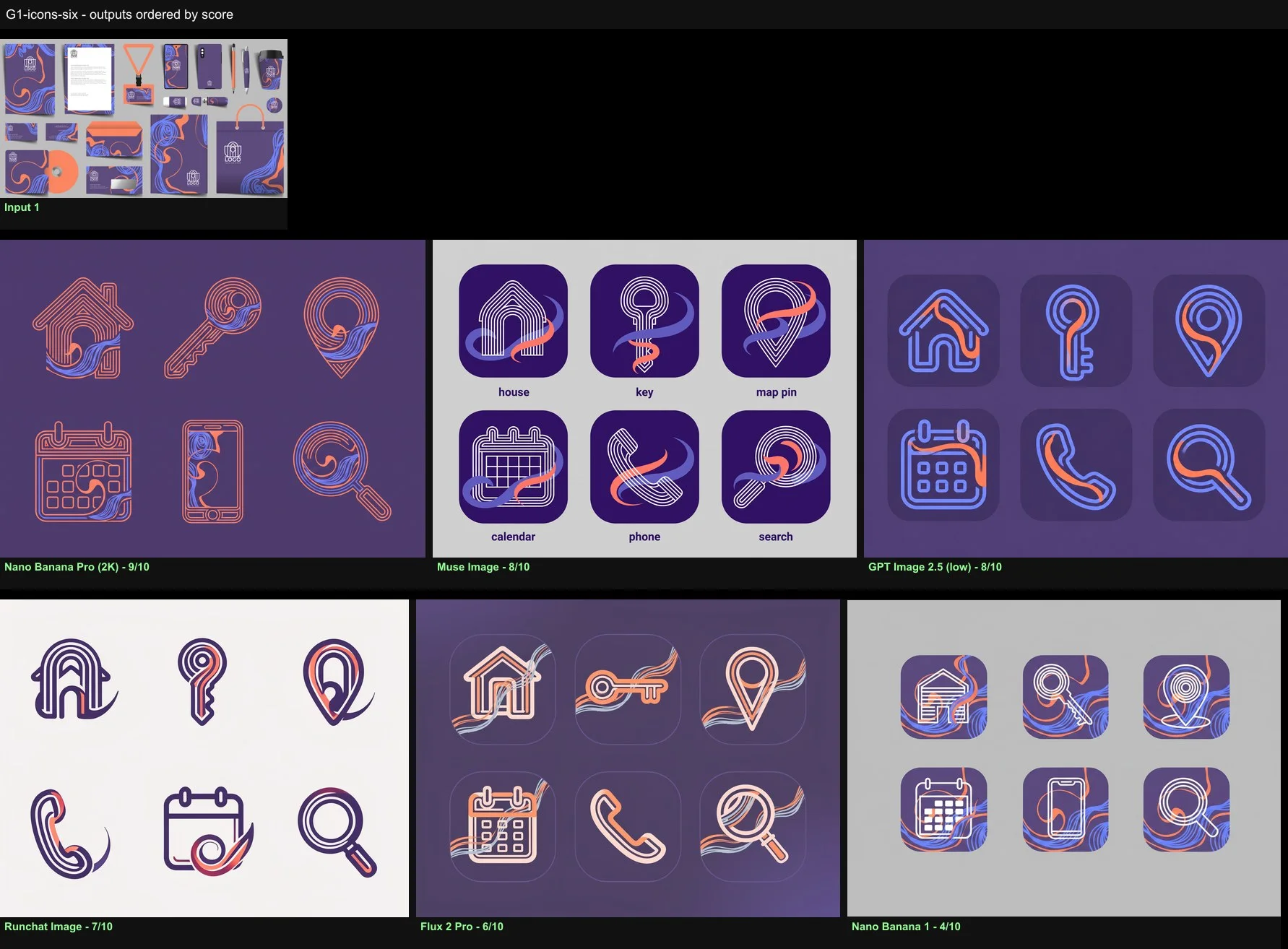
A brand kit with a purple ground, a coral and periwinkle swirl motif and an arch logo drawn as nested thin parallel lines. Our first prompts asked for icons “in the style of this kit” and got generic line icons on purple tiles from every model. Asking the model to construct each icon the way the logo is constructed, and to work a swirl stroke from the motif into each one, changed the results completely.
Study the brand kit in image 1: the arch logo drawn as nested thin parallel lines with rounded corners, and the coral and periwinkle swirl motif of flowing parallel ribbons. Design six app icons for this brand, house, key, map pin, calendar, phone and search, each constructed the same way as the logo, from nested parallel lines with rounded arches, with one flowing swirl stroke worked into each, in the kit palette on the deep purple.Nano Banana Pro and GPT Image 2 built every icon from nested lines with a swirl worked through it on the deep purple. Muse Image read the motif best of all but printed labels under the icons. Nano Banana 1 drew generic white icons on tiles with the motif as wallpaper.
The prompt describes the logo construction and the motif, lists 24 icons in a stated order in a 6x4 grid, and asks for every icon to be built from two or three nested parallel lines at the logo’s stroke weight with one periwinkle swirl stroke integrated into its form, coral on the deep purple.Nano Banana Pro delivered all 24 in order with the nested construction and an integrated swirl on every icon. GPT Image 2 was complete and ordered at lower resolution. Runchat Image, Flux 2 Pro and Nano Banana 1 duplicated and dropped icons or lost the order.

Posters

A Swiss style brief with a title, a lecturer line, three event lines and a 30-word paragraph, all to be reproduced exactly, plus a black-and-white photograph of the Azuma Tower.
Design a Swiss style poster, modern, bold and flat, using the photo in image 1. followed by the text.Nano Banana Pro reproduced every string and the paragraph on a halftone photo with black and orange blocks. GPT Image 2 was exact but quieter; Muse Image was exact but added an invented footer line. Flux 2 Pro dropped the year and misspelled FREE. Runchat Image and Nano Banana 1 re-illustrated the photo and garbled the paragraph.
The advanced brief asks for the photo to be re-perspectived into a dynamic diagonal running off two edges, tinted into a red, black and white palette, with the title interleaved behind and in front of the tower, a red band carrying the lecturer line, and the paragraph and details on a grid.Muse Image and Nano Banana Pro both tilted the tower into the composition and cut the title through it, with one small text glitch each. GPT Image 2 got all the text right with less dynamism. The other three lost the paragraph.

Relighting a render and matching a reference photograph

An Enscape render of a red-fin office building, asked for under bright morning sun; and an Enscape villa render, asked to match a reference photograph of a house on a dry Australian hillside under overcast light.
Show the building lit with bright morning sun.Muse Image moved the sun low to the left with flare and long shadows and made the trees and people photographic. Nano Banana 1 left the sun high and the image a render. Runchat Image blew out the frame and shifted the fins to brown.
Show this building lit with bright early-morning sun: low sun from the east side raking across the red fins, crisp long shadows on the facade and ground, a clear pale-blue sky and cool shadows with warm sunlit surfaces. Produce a high-quality architectural photograph: photographic trees with real foliage and bark, real people with natural poses and clothing, real cars, believable road and paving textures, accurate reflections in the glazing, natural depth of field and a professional colour grade. Keep the building design, the red fins, the set-back upper level, the glazing and the camera and framing exactly as in the render.Muse Image and Nano Banana Pro both delivered the low sun and a full realism pass. Flux 2 Pro redesigned the upper level with balconies.
Make image 1 look like the photograph in image 2.Flux 2 Pro came closest to the reference’s tone and grade, though the camera dropped. Muse Image held the house and camera under an overcast sky. Nano Banana Pro carried the fog, dry grass and dead trees but moved the viewpoint, which the view check shows. Runchat Image rendered a sunny day.
Edit the render in image 1 so that it matches the realism and photographic style of image 2: the same soft overcast light with no hard shadows, the same muted, slightly desaturated colour grade with lifted blacks, the same cool neutral sky, the same lens feel and depth. Replace the rendered planting and lawn with photographic planting in the character of image 2, dry native grasses and eucalypt-like trees, and make the paving, timber, glazing reflections and car photographic. Keep the house design, the cladding, the glazing, the pergola, the terrace and the camera and framing exactly as in image 1.GPT Image 2, Muse Image and Flux 2 Pro all produced images that read as the reference series with the house held. Nano Banana Pro matched the mood but redesigned the cladding. Nano Banana 1 applied the grade over a still-CG house.

Where each model fits

  • Muse Image: the value pick and, by a hair, the overall winner. Eleven wins at 20 credits, best design adherence, wins single-reference renders, the JSON interior, site placement, the four-material edit, the rattan pavilion and both morning-sun relights. Occasionally slow, and it sometimes turns a sofa into a chair.
  • Nano Banana Pro (2K): the safest choice when the finish matters. Best style and aesthetic scores, never last, strongest on multi-reference renders, furnishing, orthographic drawings, merges, icons and posters. Slow and 300 credits per image, so iterate elsewhere and use it for the final pass.
  • GPT Image 2 (low): dependable middle ground with reliable text, exact material assignments, complete icon sets and the best reference match on the villa. Its renders tend to look like renders, and it recoloured the sofa and lost the rug pattern when asked to furnish a room.
  • Flux 2 Pro: kept the same-finish neighbour untouched on the material edit and matched the reference photograph’s tone best, but redesigned buildings on a relight, copied the reference pavilion instead of the design, and cannot handle paragraphs or icon sets.
  • Runchat Image: 4 credits and 7 seconds. Holds the camera and furnishes a room plausibly, so try it first on view-preserving edits. Cannot do text, style transfer, drawings or anything that needs a reference read rather than copied.
  • Nano Banana 1: last in 9 of 23 tests. Re-crops to a new frame, drops and duplicates icons, garbles text and copies reference images literally. Use Nano Banana Pro instead.

Next steps