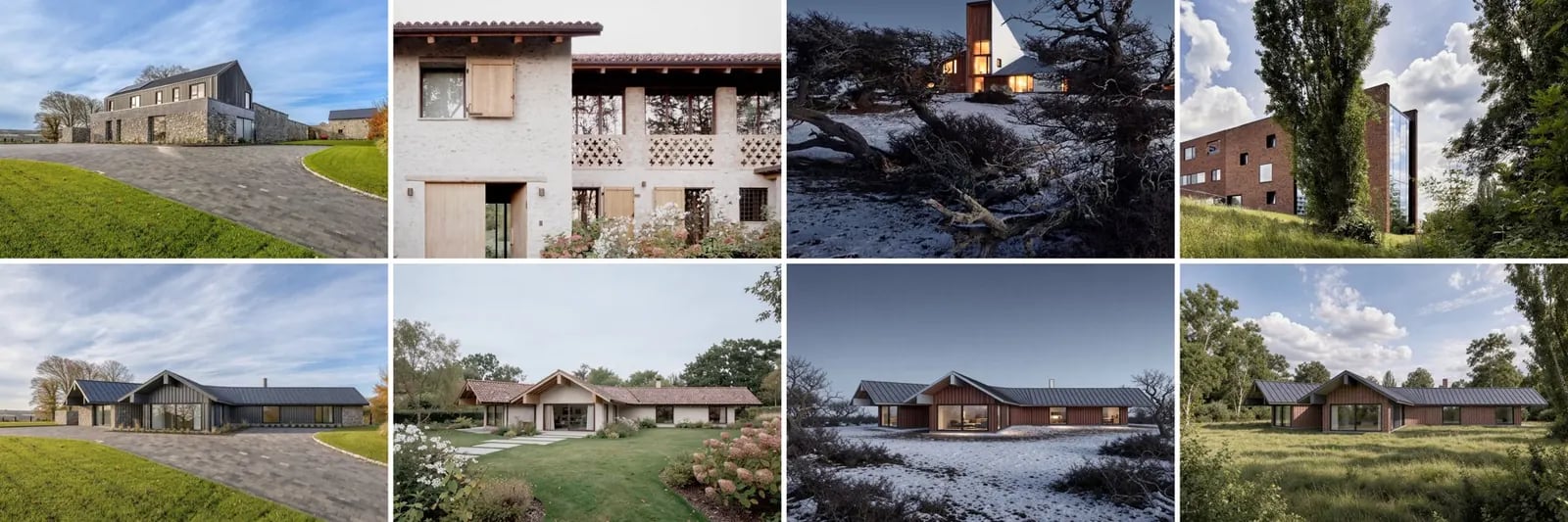
Try your design in several material and landscape palettes at once. Each render takes its look from one reference project and keeps the drawing’s camera and geometry.
Four reference projects and the house rendered in the materials and setting of each

Open the example workflow

Make a copy of this workflow in your account to try it with your own images.

How it works

  1. Rhino capture is a line drawing of the design.
  2. References is a list of four photos from ArchDaily and Divisare.
  3. Pair capture with each reference is a code node that makes a [capture, reference] pair for each reference.
  4. Render (Flux 3) runs once per pair: render image 1… using the materials, colour palette, landscape, season and light of image 2… do not copy the building form.

Tips

  • Keep reference images under about 4 megapixels. Very large images can make the run fail.

Use your own model

The image input holds a capture from our demo Rhino model, so the workflow runs as it is. To use your own model, open Rhino with the Runchat plugin signed in, set up your view, and run the node marked (optional) Rhino. Then drag its screenshot into the image input. The scripts use only the standard display modes and match layers or materials by the keywords in their inputs, so they work on any model.