

Template syntax
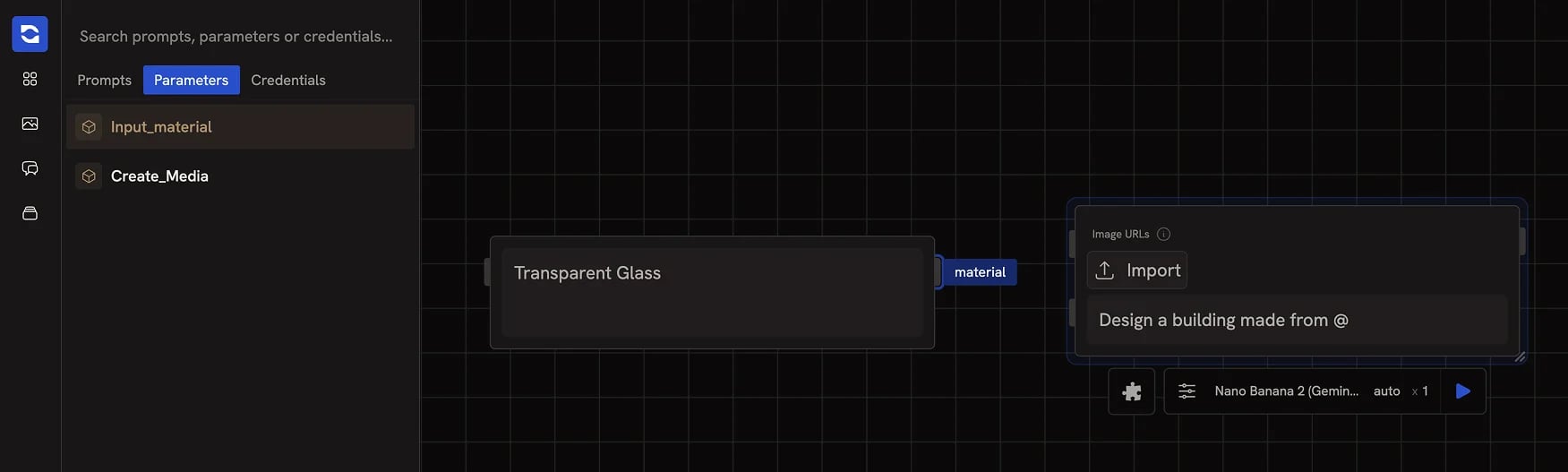
References use the syntax{{nodeId.parameterKey}} to embed the value of another node’s output parameter. When the node runs, Runchat replaces each template with the current value of the referenced parameter.
You don’t usually type these directly. Use the parameter picker in any text input.
Inserting a reference
In any text input, start typing then pressTab to open the parameters menu. Hover an option to preview which node it points to. Click to insert a tag representing the current output value. To delete a tag, click its X or press backspace.
Typing @ does the same thing but also zooms the canvas so you can see which node you’re about to reference, useful when there are many nodes on the canvas.
Run order and propagation
References behave differently from edges in two important ways:- Changing a referenced value does not automatically expire downstream nodes. With an edge, when an upstream node finishes, downstream nodes are marked as ready to re-run. References do not propagate this signal. The downstream node will only pick up the new value the next time it runs.
- When you do run the workflow, references still affect order. Runchat builds the run order from both edges and references, so a node that references another will always run after it during a multi-node run.
Next steps
- Connecting Nodes: edges, references, and published parameters compared
- Data Types: what flows through a reference and how it’s cast
- Routing: conditionally enable parts of a workflow